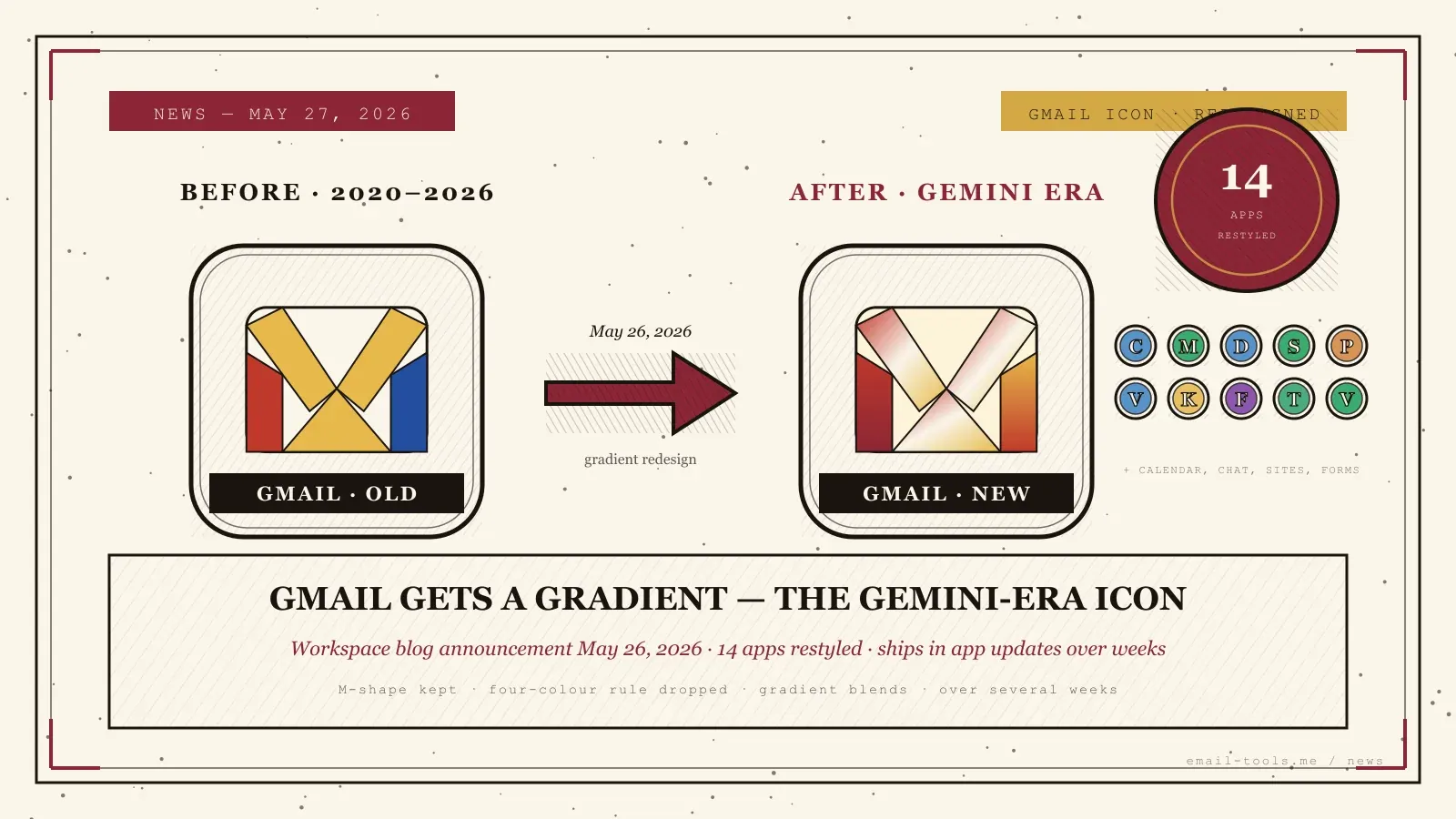
Google posted an official blog announcement on Tuesday, May 26, 2026 confirming the new visual identity for fourteen Workspace app icons — Gmail, Calendar, Chat, Meet, Drive, Docs, Slides, Sheets, Vids, Keep, Forms, Voice, Sites and Tasks. The redesign moves every app to a gradient system, drops the previous rule that forced all four Google colours into each logo, and ships as a regular app update over the next several weeks. Here is exactly what changed, how to recognise the new Gmail icon, and what it does not affect inside the inbox itself.
What Google announced
The Google Workspace Updates blog published the post “Introducing a fresh visual identity for Google Workspace app icons” on Tuesday, May 26, 2026, with the rollout starting that day for Rapid Release domains and on May 19, 2026 for the web launcher. Google’s stated rationale is that the redesign drives “consistency and cohesion across our product suite, while ensuring each individual application remains modern and recognizable on your screen.” Fourteen apps are affected; the change is icon-only — none of the apps’ interfaces or features have shifted.
The post calls the new set “logos for the Gemini Era” and frames it as the Workspace extension of a gradient design language Google first applied to the main G logo about a year earlier, then rolled into Google Home, Photos, Maps and Gemini. (Source: Google Workspace Updates, May 26, 2026; 9to5Google, May 26, 2026.) The web rollout had already started on May 19 — the workspace launcher and the Chrome New Tab page picked up the new icons that day, with individual service pages following. (Source: Chrome Unboxed, May 18, 2026.)
How the Gmail icon actually changed
Gmail keeps its M-shaped envelope silhouette and remains the only Workspace app where Google deliberately retained the four-colour heritage. What changed is the rendering. The four flat colour blocks (red, white, yellow, blue) that defined the icon since 2020 dissolved into fluid gradients, with red blending into white into yellow across the M. Every other app — Calendar, Drive, Docs, Sheets, Slides, Meet, Chat, Vids, Keep, Forms, Voice, Sites, Tasks — dropped the four-colour mandate entirely and adopted a single-dominant-colour gradient design.
The shape is the part that matters for fast recognition: open your phone, glance at the home screen, look for the M, tap. That muscle memory is intact. What is different is the colour palette inside the M and the absence of the paper-card background under the other icons. Calendar is no longer “extremely boxy” in 9to5Google’s phrasing; Meet, Chat, Vids and the rest have softer silhouettes with rounded corners and a single colour family per app. (Source: 9to5Google, April 26, 2026.)
What the redesign does not change
Nothing inside the app. The Gmail inbox, compose window, labels, filters, keyboard shortcuts and sync behaviour are unchanged. The same is true for Calendar, Drive, Docs and every other affected app — only the launcher icon, the favicon in browser tabs and the splash-screen logo are different. If you were waiting for a feature change tied to the Gemini Era branding, you are looking at the wrong rollout. The actual Gemini-driven feature work shipped separately at I/O — see Gmail Live for voice-driven inbox search, and the Gemini Spark agentic assistant rolled out earlier this month.
For context on where the AI side of Gmail is actually moving, see our coverage of Gmail Live voice search shown at Google I/O 2026 and the Gemini Spark 24/7 agent with Gmail integration. Both are real product changes; the icon refresh is purely visual identity work to keep the brand surface aligned with that AI strategy. Compare with last week’s Microsoft Outlook Lite retirement, which is the inverse story — Microsoft consolidating around one mobile codebase rather than restyling existing ones.
Reception and what to expect on your screen
Reaction has been split. Supporters note that the old icon set forced all four Google colours into nearly every logo, which made the apps hard to distinguish at small sizes. Critics point out that gradient detail can wash out in dark mode, on small home-screen tiles, or at 16-pixel favicon scale in browser tabs. PhoneArena called the overhaul “polarizing” in its rollout coverage. No usability data has been published, so whether the new set is genuinely more recognisable than the old one is unresolved.
The practical end-user impact is small and short-lived: the new icon ships inside the next Gmail app update on Android and iOS, so users will see the change once they take the update from the Play Store or App Store — a window of several weeks for Scheduled Release Workspace domains and consumer accounts. (Source: 9to5Google, May 22, 2026; Android Central, May 18, 2026; PhoneArena, May 18, 2026.) There is no way to opt out, no admin toggle, and no rollback. The shape and position of every icon stay the same, so the muscle memory cost is roughly one tap of hesitation the first day, then nothing. If you preferred the old four-colour envelope strongly, a custom icon pack on a third-party Android launcher is the only durable workaround.

Alexis Dollé, email expert for 10+ years. Founder of Email Tools. I test every email client and utility myself, then write about them the way I’d explain them to a friend — no marketing fluff, no sponsored rankings, every claim sourced.
LinkedInFrequently asked questions
When exactly did the new Gmail icon arrive on my phone? — May 26, 2026 announcement, rollout over several weeks
Google posted the official announcement on the Workspace Updates blog on Tuesday, May 26, 2026, with the rollout starting that day for Rapid Release domains and on May 19, 2026 for the web app launcher. Personal Gmail accounts and Scheduled Release Workspace domains see the new icon over the following several weeks, pushed via a regular Gmail app update on Android and iOS rather than a server-side flag. If the icon on your home screen still looks like the old four-colour envelope, the Play Store or App Store update has not landed yet — there is nothing to do but wait or manually update.
Did Gmail keep the red envelope, or did it lose the colours? — kept the M shape, kept the four colours, swapped flat blocks for gradients
Gmail keeps the M-shaped envelope silhouette that has identified the app since 2020, and Gmail is the only Workspace app where Google deliberately retained the four-colour heritage. What changed is the rendering: instead of four flat colour blocks (red, white, yellow, blue) sitting against a paper background, the M is now drawn with soft gradients that blend red into white into yellow. Calendar, Drive, Docs, Sheets and the rest dropped the mandatory four-colour rule entirely and got single-dominant-colour gradient designs.
Why is Google doing this now? — to align Workspace with the Gemini-era gradient brand system
Google framed the change as “logos for the Gemini Era”, extending a gradient design language it first applied to the main G logo about a year earlier and has since rolled out to Google Home, Photos, Maps and Gemini. The Workspace team’s stated rationale is that the gradient system “gives every app a more distinct identity” while keeping consistency across the suite. The unstated commercial driver is the same Gemini integration story Google has been telling at every product surface for two years — see Gmail Live voice search at I/O and the Gemini Spark agent, both tied to the same AI strategy.
Will the redesign change anything inside Gmail itself? — no, the inbox, compose, filters and shortcuts are unchanged
No. The change is strictly the launcher icon, the favicon in browser tabs, and the splash-screen logo. The Gmail inbox, the compose window, the labels and filters UI, the keyboard shortcuts, and the underlying mail behaviour are unchanged. The same is true for Calendar, Drive, Docs, Sheets, Slides, Meet, Chat, Vids, Keep, Forms, Voice, Sites and Tasks — the apps’ interfaces are not affected by this rollout.
Reception so far — is anyone actually complaining? — split, with critics flagging readability at small sizes and in dark mode
Reaction has been split. Supporters argue the previous icon set forced all four Google colours into nearly every logo, which made the apps hard to distinguish at small sizes. Critics point out that gradients can wash out in dark mode, on small home-screen tiles, or in browser tabs where favicons render at 16 pixels. PhoneArena called the overhaul “polarizing” in its May 18 piece. No usability data from Google has been published, so the question of whether the new set is actually more recognisable than the old one is open.
Can I keep the old Gmail icon? — not officially; custom launcher icon packs on Android are the only workaround
Not officially. The icon ships inside the Gmail app binary, so once you take the update on Android or iOS, the new icon replaces the old one in the launcher. On Android, third-party launchers like Nova let you assign a custom icon pack, which is a workaround if you prefer the old four-colour envelope. On iOS you can build a Shortcuts-based home-screen icon, but it costs a tap through the Shortcuts app on launch. The simplest path is to wait and decide whether the new design grows on you — the rollout window is several weeks, so updating the Gmail app on your phone today only commits you ahead of schedule.
Sources
- Google Workspace Updates, May 26, 2026 — Introducing a fresh visual identity for Google Workspace app icons (official announcement; affected apps: Gmail, Calendar, Chat, Meet, Drive, Docs, Slides, Sheets, Vids, Keep, Forms, Voice, Sites, Tasks; rationale = “consistency and cohesion”; rollout from May 26 for Rapid Release)
- 9to5Google, May 26, 2026 (Abner Li) — Google on why it redesigned the Gmail and Workspace icons (“logos for the Gemini Era”; gradient design language traced back to the main G logo redesign one year earlier; apps no longer required to carry all four Google colours except Gmail)
- 9to5Google, May 22, 2026 — Gradient Google icon redesign rolling out on Android, iOS, & web (rollout cadence; web launcher first; Android and iOS via regular app updates over several weeks)
- Chrome Unboxed, May 18, 2026 (Robby Payne) — Google’s new gradient Workspace icons are officially rolling out on the web (workspace launcher and Chrome New Tab page first; individual service pages following; Gmail noted as the exception to the four-colour rule removal)
- PhoneArena, May 18, 2026 — Google’s polarizing icon overhaul is officially out (mixed reception; concerns about readability at small icon sizes and in dark mode; no rollback path)
- Android Central, May 18, 2026 — Google’s new gradient icons for Gmail, Calendar, Drive and more are finally rolling out (rollout begins on Android via Play Store app updates; soft colour gradients and more rounded corners; alignment with company-wide aesthetic from the main G refresh)